Faceless videos with AI,
ready before your coffee's cold.
Type a topic and Vaideo writes the script, voices it with a natural AI narrator, pulls stock photos and clips that actually fit and adds word-by-word captions. Vertical for TikTok, Shorts and Reels or horizontal for YouTube, in a few minutes.
No credit card for the free plan · Prices in euros, shown in US dollars at checkout
Made for the US
What US faceless channels are posting right now
Faceless doesn't mean generic. These are formats that work with narration and stock footage, tied to the American calendar so you always know what to post next.
Sept – Feb
Football and sports trivia
Wild stats, legendary comebacks and “did you know” facts that ride the NFL season, March Madness brackets and the World Series. Keep it to facts and history, not team logos or game footage.
Year-round
50 states, 50 episodes
One state per video: strange laws, record-breakers, forgotten history. A built-in series that your audience can binge and that never runs out of episodes.
Year-round
Money basics, minus the hype
Credit scores, 401(k) vs. IRA, budgeting apps and the 30-day rule, explained in under a minute. Add a clear “not financial advice” line and you're in a niche advertisers love.
May – Sept
National parks and road trips
Yellowstone, Zion, Route 66 and the small towns in between. Very visual, tons of stock footage, and it pairs naturally with gear and travel affiliate links.
Oct – Dec
Holiday deep dives
The real history of Halloween, why Thanksgiving is on a Thursday, Black Friday tech explained. Seasonal topics spike every year, so the same series pays off again next fall.
Year-round
Bilingual channels
Make each video in English and Spanish from the same idea. With 11 narration languages, reaching Spanish-speaking viewers in the US is one extra click, not a second production.
Can you get paid in the US? Where things stand
TikTok Creator Rewards Program · Available
Open in the US: 18+, 10,000 followers and 100,000 views in the last 30 days. Only original videos over 1 minute count, and TikTok asks for 1080p or higher.
YouTube Partner Program · Available
Fan funding from 500 subscribers; Shorts ad revenue sharing at 1,000 subscribers plus 10 million Shorts views in 90 days (or 4,000 long-form watch hours in 12 months).
TikTok Shop affiliate · Available
TikTok Shop runs in the US, so you can tag products and earn a commission. Eligibility is set in the app and changes often.
Facebook content monetization · Limited
Invite-only for now: you can register interest from the Professional Dashboard under Monetization.
As of October 2026 per each platform's official pages. Rules change often, so check the current terms before you plan around them.
Read the full US guideWhat people in the US search for
The questions we hear most from American creators, and the ones our US guide answers:
- “faceless YouTube channel ideas”
- “how to make money on TikTok”
- “TikTok Creator Rewards requirements”
- “YouTube Shorts monetization”
- “free AI video generator”
- “text to video AI”
- “side hustle ideas 2026”
This was made with Vaideo
One prompt, two minutes, ready-to-publish video. No manual editing, no camera, no learning curve.
Video fully generated with Vaideo · Imagery via Unsplash
How it works
Three steps. No editing skills needed.
Write your prompt
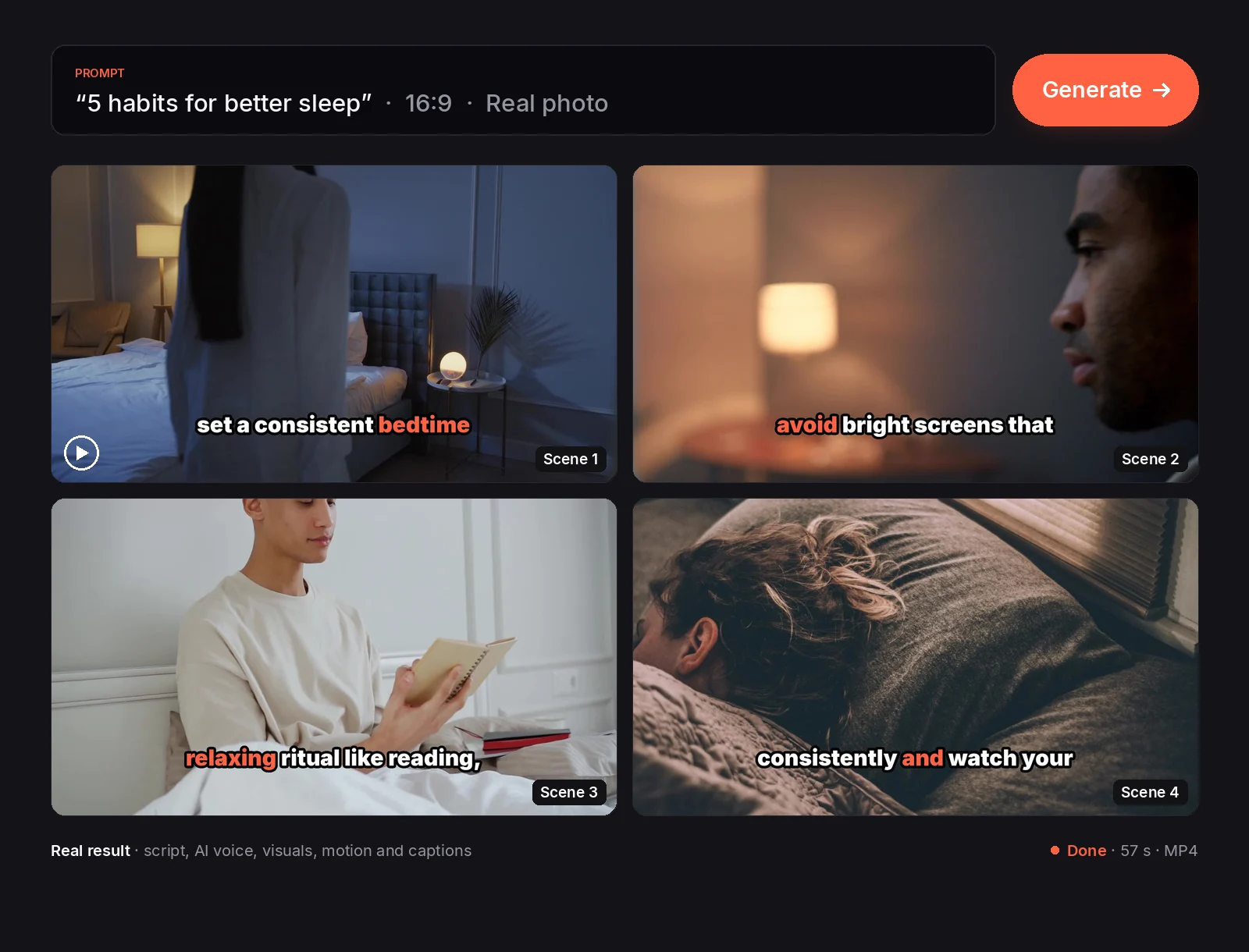
Tell Vaideo what the video is about or paste an article URL. One sentence is enough: “5 habits for better sleep”, “the history of coffee”…
Script, voice and images
AI writes a scene-by-scene script, narrates it with a natural voice in any of 11 languages (American English, Spanish and more) and finds stock photos and clips that match each scene.
Video ready
Automatic edit with zoom, pan and animated captions. Review it, swap any scene's image and download the MP4, upload it to YouTube or open it in Vaideo Editor to fine-tune it.
New · From an article
Already written it? Turn it into a video
Paste the link to a blog post, a news story or a newsletter. Vaideo summarizes it in its own words, narrates it with an AI voice and builds it with the article's own images.
- ✓No copied sentences: the script is rewritten
- ✓Uses the article's images; gaps filled with stock or AI
- ✓9:16 or 16:9, with captions
New · Vaideo Editor
Create with AI, edit like in CapCut. Free.
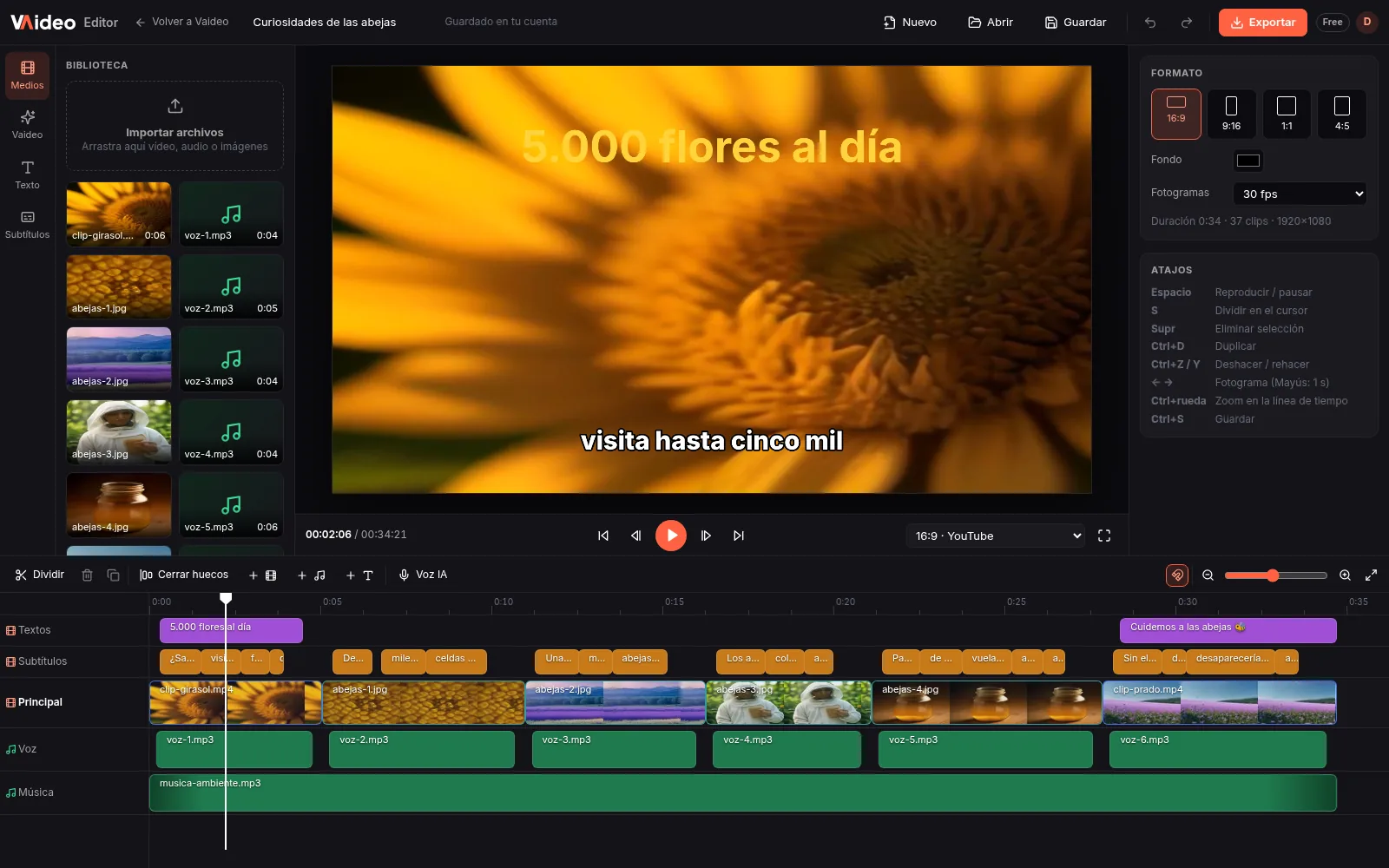
Vaideo Editor is a timeline video editor that runs in your browser. It opens any AI-made video in separate tracks (video, voice and captions), or you can start from your own clips, audio and images.
Cut and assemble
Split, delete, duplicate and close gaps. Undo and redo.
Text and captions
Text layers and a global caption style. Fix the captions the AI generated.
Your audio
Audio tracks with volume up to 200%, mute and fades. Add your own music or voice.
Speed and color
From 0.25x to 4x. Brightness, contrast, saturation, exposure, temperature and tint.
Any format
16:9, 9:16, 1:1 and 4:5 canvases, with scale, position, rotation and opacity.
Export MP4
Up to 1080p free, 2K and 4K with Unlimited. What you upload exports with no watermark.
Works on computers (900 px screen or wider), not on phones. Upload files up to 2 GB with a free account. No templates, music library or transitions yet.
Features
What you need to publish more, no editing skills needed
Actually fast
A finished video in a few minutes (2-6 is typical) from your prompt. The AI does the edit; if you want to change something, open it in Vaideo Editor.
Free stock or AI images
Unsplash and Wikimedia built in, or AI-generated images. 10 visual styles and scene-by-scene image swaps.
Animated captions
Burned-in captions synced to the narration, made to work with the sound off.
Natural AI voice
Narration in 11 languages, so you can run an English channel and a Spanish one for US Latino audiences from the same idea.
Vertical or horizontal
9:16 for Shorts, Reels and TikTok or 16:9 for YouTube. Up to 30 s free, 5 min with packs and 10 min on Unlimited.
Download or publish
Download the MP4 or, on the Unlimited plan, connect your YouTube channel and upload directly. AutoPilot publishes to your channel for you.
Ideas to start creating viral videos
Pick the angle that fits your goal. Each landing explains how Vaideo solves that specific pain point.
Free and zero cost
Fast and in bulk
For every social network
No camera, no editing
By niche
Pricing
Start free. Pay only for the videos you need.
Unlimited at €39 (was €49)
and one-off packs from €5
Packs are a one-time payment, no subscription, and the videos never expire.
Prices are in euros. €5 is about US$5.60, and checkout shows the amount in dollars.
Free
Try Vaideo with no commitment.
No card needed
- ✓1 free video a day
- ✓Up to 30 seconds
- ✓720p resolution
- ✓Vaideo watermark
- ✓Generated in turns: you wait your turn in the queue
Video packs
Buy the videos you need, when you need them.
One-time payment · never expire
Up to €15 less than in packs of 5
- 5 videos€5
- 15 videos€12
- 40 videos€25
- ✓No watermark
- ✓Up to 5 minutes · 1080p
- ✓Pro AI voices
Unlimited
-20%Most powerfulFor publishing daily and automating your channel.
Billed monthly
Save €10 a month
- ✓Unlimited videos (fair use)
- ✓No queue: your video starts right away
- ✓Up to 10 minutes
- ✓1080p resolution
- ✓2K and 4K export in Vaideo Editor
- ✓No watermark
- ✓Direct YouTube upload
- ✓AutoPilot: automatic videos published to your channel
✓ Vaideo Editor free for everyone · 2K and 4K with Unlimited
Packs are a one-time payment and never expire. Cancel Unlimited anytime. Failed videos don't count against you.
FAQ
Questions from US creators
How much does Vaideo cost in US dollars?+
We charge in euros, and at checkout you see the approximate amount in US dollars. At the October 15, 2026 rate: 5 videos for €5 (about US$5.60), 15 for €12 (about $13.45), 40 for €25 (about $28) and Unlimited at €39/month (about $43.70). Your bank's exchange rate may differ slightly.
Will my videos qualify for TikTok's Creator Rewards Program?+
Vaideo can make videos that meet the format rules: over 1 minute and in 1080p, which means a pack or Unlimited (the free plan is 30 seconds in 720p). Whether you get paid depends on TikTok: you need to be 18+, have 10,000 followers and 100,000 views in 30 days, and the content has to be original.
Can Vaideo post straight to TikTok or Instagram?+
No. You download the MP4 and upload it yourself, using the titles, descriptions and hashtags from the video's posting kit. The only automatic upload is to YouTube, with AutoPilot on the Unlimited plan.
Do I have to disclose AI or sponsored content?+
Use each platform's AI label when it asks for it; the posting kit reminds you. If a brand pays you or sends you free stuff, the FTC expects a clear disclosure in the video itself and in the caption, not buried in hashtags.
Can I make videos in Spanish too?+
Yes. Narration comes in 11 languages, including English and Spanish, and the script is written directly in the language you pick, so a bilingual channel doesn't mean double the work.
Does it do animation or cartoon characters?+
No. Vaideo builds videos from stock photos and video clips with zoom, pan and captions. It doesn't create its own animation or 3D, and AI fiction is limited, so it's at its best with facts, history and explainers.
Do I need editing skills?+
No. Vaideo does the full edit. If you want to tweak something, open the video in Vaideo Editor, free in your browser, to trim scenes, fix captions or add your logo.
Your first video, in minutes
Create a free account and make 1 video a day, no credit card. When you need more, watermark-free packs start at €5 (about US$5.60).
Create my free account